CRIME Local
- 3.6
- Rating
- 10.00K
- Installs
- Free
- Price

 Analysis by App-foxy
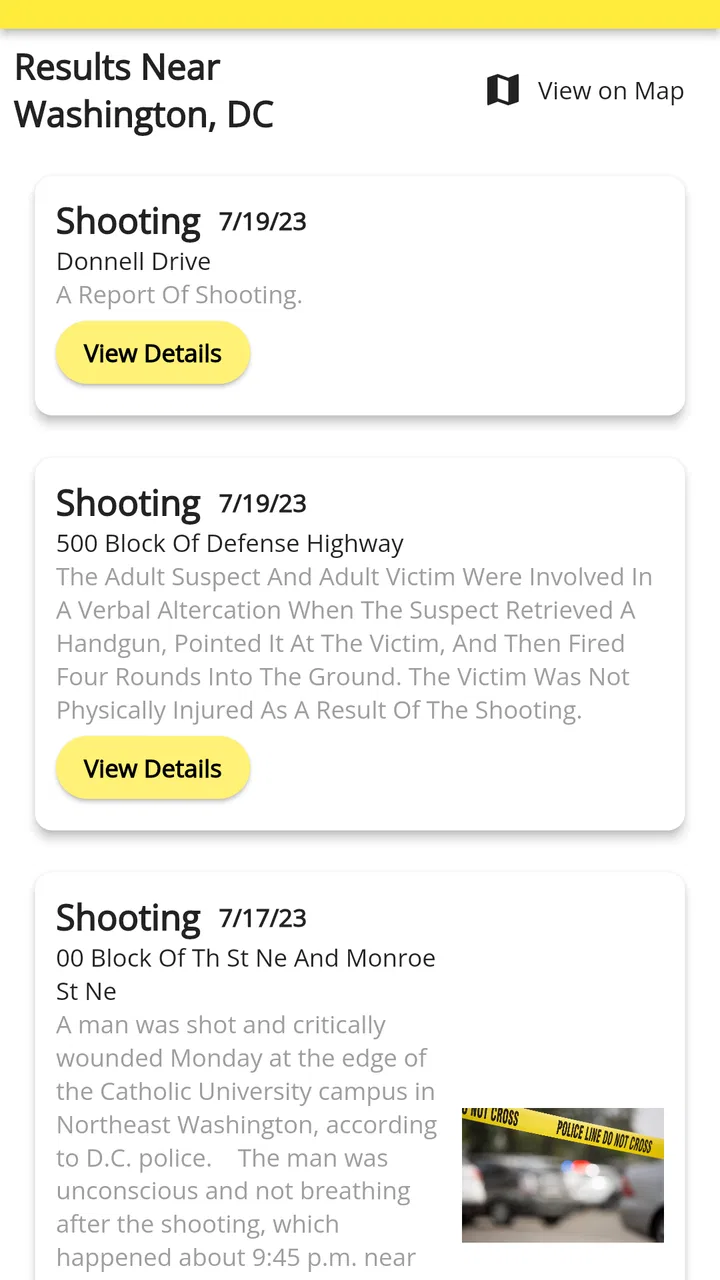
When I open a local crime app, I am not looking for drama or a wall of alarming headlines. I want a quick way to understand what has happened near a place I care about, then decide whether I need to change a route, pay closer attention, or simply move on with my day. CRIME Local is built around that practical need. It is a free news and magazines app from SpotCrime that gathers crime-related information into one place rather than asking me to search through several local sources.
My first impression is that it works best as a local awareness tool, not as an emergency service or a replacement for official public-safety channels. That distinction matters. An aggregator can help me notice patterns and recent reports, but I would not use it to verify an active incident, report a crime, or make a serious safety decision without checking the appropriate local authority. Used with that realistic expectation, the app has a clear purpose and can be useful for people who want a simple starting point.
What to expect when you open CRIME Local
The app’s main appeal is convenience. Instead of separately checking local news sites, neighborhood discussions, and other crime-reporting pages, I can begin with one focused destination. The experience is aimed at people who want nearby information without turning the task into a research project. That makes it especially suitable for a quick check before leaving home, commuting, visiting a different area, or deciding how closely to monitor a neighborhood.
You May Also Like

 AccuWeather: Weather Radar
AccuWeather Review: A Quick, Clear Forecast for Everyday Decisions
For everyday plans, the best forecast is the one you can understand quickly. AccuWeather makes rain timing, radar, and local conditions easy to act on, with a few trade-offs.

 Hill Climb Racing
Why Hill Climb Racing Still Turns Crashes Into One More Run
A tiny car, a bumpy hill and one more upgrade: Hill Climb Racing keeps resurfacing because its simple chaos makes every near-miss feel personal.

 AliExpress - Shopping App
AliExpress Makes Global Shopping Feel Personal, but Shoppers Bear the Risk
AliExpress turns a global marketplace into a pocket-sized discovery engine. Its reach is useful, its shopping loop compelling, and its trade-offs easy to miss.

 Lords Mobile: Kingdom Wars
Lords Mobile Is a Kingdom-Building Routine, Not a Quick Match
A case-by-case verdict on the building, battles, device demands, and social commitments that make Lords Mobile rewarding for some players and exhausting for others.

 PDF Scanner app - TapScanner
TapScanner Makes Paperwork Easier to Capture, Check, and Share
TapScanner makes scanning with a phone feel less like a rescue operation and more like a dependable step in getting work done. Its capture tools are useful, though not flawless.

 Block Blast!
 Shows How Much a Puzzle Game Can Leave Out
A quiet grid game shows why puzzle players increasingly value instant clarity, repeatable skill and low-pressure play—and where the genre still needs to catch up.
More From Our News Desk
View All News


It is also worth understanding what an aggregator can and cannot do. Bringing reports together does not automatically make every item equally complete, current, or useful. A brief entry may tell me enough to recognize an event but not enough to understand the full context. A headline may sound serious while still requiring the original source for details. I therefore treat each item as a lead for awareness, not as a complete incident file.
The app is marked for Everyone, which fits its straightforward information purpose. It is available at no cost, so trying it does not require a subscription decision before I can judge whether its local coverage suits me. The developer is SpotCrime, and the app has reached over ten thousand installs. Its average rating is 3.6, based on more than one hundred ratings, with forty reviews. I read that as a sign of a useful but not universally satisfying experience: worth testing, but not something I would recommend blindly to every reader.
CRIME Local was released on July 21, 2023, and the current version is 1.1.4. It runs on Android 6.0 or later, which gives it a broad compatibility range for people using older phones. That is helpful if I want a dedicated local-information tool without needing a recent device. At the same time, the age of the supported operating system means the visual experience may not feel as modern as apps designed only for newer Android versions.
Who gets the most value from it
I think the strongest audience is someone who regularly moves through the same local area and wants a repeatable way to stay aware. A parent might use it as one part of planning a walk or school commute. A renter could check the surrounding area while comparing neighborhoods. Someone returning home late might use it to review recent local activity before choosing between familiar routes. None of these uses turns the app into a guarantee of safety, but each gives the user a more informed starting point.
The app is less suitable for readers who expect minute-by-minute emergency alerts, detailed investigative reporting, or a complete official record of every incident. It is also not the right tool if I need to contact emergency services or submit a report. In those situations, the usual official channels are more appropriate. The value here is organization and awareness, not authority.
Getting started without overthinking the setup
After installing it, I would begin with one specific goal rather than trying to understand every part of the app at once. For example, I might choose the area around my home or workplace and look for recent entries. Starting with a familiar location gives the results meaning immediately: I can recognize streets, compare what I see with my own knowledge, and notice whether the information feels relevant to my daily routine.
A useful first step is to decide what “local” means for me. That could be the immediate neighborhood, the route between home and work, or a wider area that includes family members and regular destinations. If I search too broadly, the amount of information may become distracting. If I focus too narrowly, I may miss activity just beyond the boundary that matters to my plans. I prefer to begin small, then widen the view only when I have a reason.
I would also avoid interpreting the first screen as a ranking of the safest and least safe places. A collection of reports reflects what has been gathered and displayed, not a complete measurement of risk. Different locations can have different reporting habits, population sizes, and levels of public attention. That is one of the most important mental adjustments for a first-time user: the app can show information about incidents, but it should not be treated as a simple scorecard for an entire neighborhood.
Because it is a news-oriented app, I use it in short sessions. I check the area, read the entries that appear relevant, and leave once I understand what I needed. That habit keeps the app useful instead of allowing an endless stream of worrying stories to shape my view of everyday life. If I were setting it up for a family member, I would explain this approach before handing over the phone: look for practical context, not reasons to panic.
The first meaningful success
The first successful action is not merely opening the app. It is finding a local item that answers a real question. Before searching, I might ask myself, “Has anything recently happened near the route I use to the station?” or “What kind of reports are appearing around the apartment I am considering?” Then I would use the app to investigate that specific question and read beyond the first attention-grabbing line.
This approach makes the result easier to judge. If I find a relevant entry, I can note its location and general nature, then consider whether it changes anything I actually plan to do. If it does not, I have still completed a useful check without getting lost in unrelated reports. If the item raises a serious concern, I know that the next step is to consult an authoritative local source rather than treating the aggregator as the final word.
One practical workflow is to check before a change in routine. If I am visiting a new part of town for an evening event, I can review the destination and the route area in advance. I would not use the result to label the entire district as dangerous. Instead, I would use it to identify whether I should allow extra travel time, stay on familiar public routes, or make sure someone knows my plans. The app becomes useful when it supports a decision I was already preparing to make.
Another helpful workflow is comparison over time, handled cautiously. I can return to the same area on different days and observe what kinds of reports appear. This may help me understand the local information flow, but I would not turn a few visits into a statistical conclusion. The insight is about becoming familiar with the app’s coverage and presentation, not creating a private crime index from incomplete observations.
How to read results responsibly
I pay attention to the difference between an event being nearby and an event being directly relevant to me. A report close to my home may involve circumstances that do not resemble my routine at all. Conversely, a report farther away may matter if it affects a route or destination I use. Location is a starting point, not the entire meaning of the report.
I also look for context before reacting. A short listing can be easy to misunderstand when read quickly, especially if I am already anxious. I try to identify what is actually described, where it occurred, and whether I need more information from the original source. This simple pause is one of the best ways to avoid turning a useful awareness app into a source of unnecessary fear.
My strongest recommendation is to keep official resources available separately. If something appears urgent, confusing, or personally connected, I would verify it through local authorities or established local news rather than relying on an aggregated entry alone. That is not a weakness unique to this app; it is a basic limitation of this type of service. The important thing is to build the habit before an urgent situation occurs.
Common confusion and the limits I noticed
The first common misunderstanding is expecting complete coverage. A news aggregator feels comprehensive because it puts many items in one interface, but that does not mean every incident will appear or that every displayed item has the same depth. If I need an exhaustive official record, I would look for a government or law-enforcement source designed for that purpose.
The second is confusing convenience with immediacy. A report can be useful without being an instant alert, and I would not assume that the app will notify me about every event as it happens. For urgent safety information, official emergency communication remains the better choice. CRIME Local is more comfortable as a check-in tool than as my sole warning system.
The third confusion concerns neighborhood judgment. Seeing several entries in one area can feel like proof that the area is broadly unsafe, but that conclusion may ignore reporting patterns and the difference between isolated events. I use the app to ask better questions, such as whether I should learn more about a particular route or source, rather than to make sweeping judgments about residents or communities.
There is also a practical attention cost. Crime-related headlines naturally attract the eye, and repeated checking can make rare events feel constant. I would set a purpose for each visit and stop when that purpose is answered. This is especially important for people who already find alarming news stressful. An app can be informative and still deserve boundaries.
The rating of 3.6 gives me another reason to keep expectations measured. It suggests that the experience may work well for some local-information needs while leaving other users wanting better coverage, presentation, or consistency. Since the app is free, I see a low-risk way to test it in my own area. If the results are too sparse or not relevant, uninstalling it is more sensible than forcing it into a role it cannot fill.
When another option is better
If I want broad local journalism, a general news app may provide more background, interviews, and follow-up reporting. If I want official incident information, a municipal or law-enforcement website may be more authoritative. If I want immediate emergency warnings, a dedicated government alert system is likely the better fit. If I want neighborhood conversation, a community platform may offer more personal context, although that can bring its own reliability problems.
CRIME Local sits between those choices. It is more focused than a general news reader and more convenient than manually searching several sources, but it does not replace the authority of official channels or the depth of a full news report. I would choose it when my main question is, “What local crime-related information should I look into?” I would choose something else when my question is, “What exactly happened, what is confirmed, and what should I do right now?”
My next-step routine after the first check
Once I have completed the first useful search, I would make the app part of a limited routine rather than a constant background habit. A quick check before an unfamiliar trip is reasonable. Repeatedly refreshing the same area without a clear purpose is not likely to improve my decisions. The best use is intentional: define the place, identify the relevant report, verify important details, and then act calmly.
I would also keep notes mentally separate from conclusions. For example, I might remember that a route had a report worth checking, but I would not describe the whole route as unsafe based on that single observation. If I am comparing homes or planning a regular commute, I would combine the app with daytime visits, local knowledge, transport information, and official resources. That broader process is much more reliable than asking one app to answer every safety question.
For a first-time user, the reassuring path is simple: install the free app, start with a familiar area, read one relevant item carefully, and decide whether the information helps with a real decision. If it does, return when you have a clear reason. If it does not, there is no need to keep checking out of habit. The current version, 1.1.4, supports a straightforward trial on Android 6.0 or newer, so the decision can be based on local usefulness rather than a large upfront commitment.
After using it this way, my view is balanced. SpotCrime has made a focused tool for gathering crime-related local news, and that focus is valuable when I want a faster starting point than a general search. The free price and broad Android compatibility make experimentation easy, while the Everyone age rating keeps its intended audience wide. Still, the app requires sensible interpretation, source verification, and restraint around alarming information.
I would recommend CRIME Local to someone who wants a convenient local crime-news overview and understands that an aggregator is a first step, not an official emergency system. I would skip it if I needed guaranteed real-time alerts, complete incident records, or detailed reporting in every location. For the right user, its success is modest but meaningful: it helps turn a vague concern about a place into a focused information check, which is often exactly what a free local-awareness app should do.
FAQs for CRIME Local
01What is CRIME Local and how does it work?
CRIME Local is a community-driven app designed to keep you informed about criminal activities in your area. It aggregates data from various sources, including local law enforcement and user reports, to provide real-time alerts and detailed crime maps. This allows users to stay updated on potential threats in their neighborhoods.
02Is CRIME Local available for both Android and iOS?
Yes, CRIME Local is available on both Android and iOS platforms. Users can download the app from Google Play Store for Android devices or the Apple App Store for iOS devices. This ensures that a wide range of users can access the app's features and stay informed about local crime.
03Does CRIME Local require access to my location?
Yes, CRIME Local requires access to your location to provide accurate and real-time crime alerts specific to your area. The app uses your location to tailor notifications and display relevant crime data on the map. Your privacy is respected, and location data is only used to enhance the app's functionality.
04Can I report crimes using CRIME Local?
Absolutely! CRIME Local encourages users to report crimes they witness. By contributing reports, you help the community and law enforcement stay updated on local incidents. The app provides an easy-to-use interface for submitting reports, which can include details like the type of crime, location, and any related information.
05Is there a cost to use CRIME Local?
CRIME Local offers a free version with essential features to keep you informed about neighborhood crime. However, there may be a premium version that unlocks advanced features, such as detailed analytics and customizable alerts. Check the app store listing for the latest information on pricing and features.
Pros
- Intuitive user interface design.
- Real-time crime alerts.
- Customizable notifications.
- Detailed crime maps.
- User community for updates.
Cons
- Limited to certain regions.
- Requires constant internet connection.
- Ads can be intrusive.
- Some data may be outdated.
- Privacy concerns with location tracking.

CRIME Local
Gallery